
MCP Tools and Resources
Complete reference for Nomik's 21 MCP tools, 9 resources, and 6 prompts that give AI assistants structured access to your code knowledge graph.
What is MCP?
The Model Context Protocol (MCP) is an open standard by Anthropic that connects AI assistants to external tools and data sources. Nomik implements an MCP server that gives AI assistants direct, structured access to your code knowledge graph.
Instead of the AI reading files and guessing at relationships, it queries the graph to get precise, traversal-based answers.
How It Works
The AI assistant automatically selects the right Nomik tool based on your question. No manual tool selection needed.
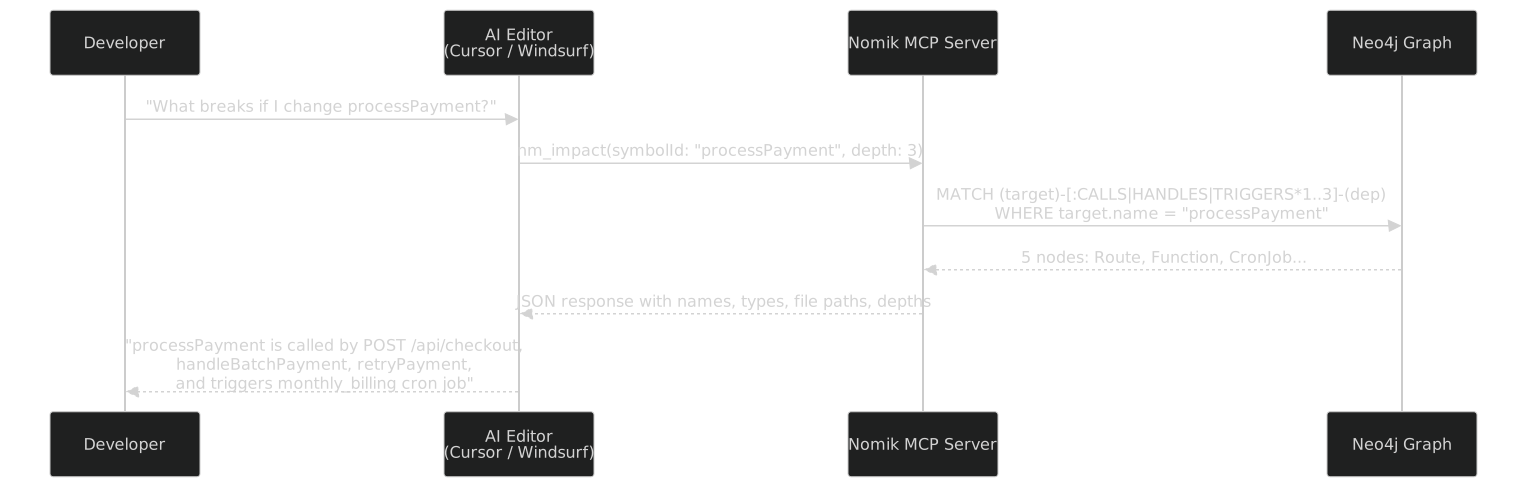
"What breaks if I change processPayment?"[
{ "name": "POST /api/checkout", "type": "Route", "depth": 1, "file": "src/api/checkout.ts:12" },
{ "name": "handleBatchPayment", "type": "Function", "depth": 1, "file": "src/services/batch.ts:34" },
{ "name": "retryPayment", "type": "Function", "depth": 1, "file": "src/services/retry.ts:8" },
{ "name": "POST /api/batch", "type": "Route", "depth": 2, "file": "src/api/batch.ts:5" },
{ "name": "monthly_billing", "type": "CronJob", "depth": 2, "file": "src/jobs/retry.ts:1" }
]The AI then uses this precise data to give you an accurate answer — no hallucination, no guessing.
Real Examples
Here are real questions you can ask your AI assistant once Nomik is connected:
"Find all functions related to payment"
→ AI calls nm_search(query: "payment") → returns matching functions with file paths"What breaks if I rename UserService?"
→ AI calls nm_rename(symbol: "UserService") → returns definition, all callers, importers, affected files"Which functions write to the users table?"
→ AI calls nm_db_impact(table: "users") → returns all READS_FROM and WRITES_TO with file paths"Are there any dead code or god files?"
→ AI calls nm_health(includeDeadCode: true, includeGodFiles: true) → returns full health report"Which tests should I re-run after changing processPayment?"
→ AI calls nm_test_impact(symbol: "processPayment") → returns affected test files"Show me the execution flow from POST /api/checkout"
→ AI calls nm_flows → traces route → handler → services → DB → external APIs"What services communicate via message queues?"
→ AI calls nm_service_links → returns producer/consumer pairs for all queues, events, topicsSetup
Automatic Setup (Recommended)
nomik setup-cursor        # Cursor AI
nomik setup-windsurf      # Windsurf AI
nomik setup-claude        # Claude Desktop
nomik setup-antigravity   # Antigravity Editor
Each command auto-creates the correct config file with your Neo4j credentials and project ID.
In stdio mode (default), the IDE launches the MCP server on demand. You do not need to run nomik serve.
Manual Configuration
{
  "mcpServers": {
    "nomik": {
      "command": "npx",
      "args": ["-y", "-p", "@nomik-ai/cli", "nomik-mcp"],
      "env": {
        "NOMIK_GRAPH_URI": "bolt://localhost:7687",
        "NOMIK_GRAPH_USER": "neo4j",
        "NOMIK_GRAPH_PASS": "nomik_local",
        "NOMIK_PROJECT_ID": "my-project",
        "NOMIK_ROLE": "dev",
        "NOMIK_SAMPLING": "false"
      }
    }
  }
}
Config file locations by editor:
| Editor | Config Path |
|---|---|
| Cursor | .cursor/mcp.json (project root) |
| Windsurf | ~/.codeium/windsurf/mcp_config.json |
| Claude Desktop (Windows) | %APPDATA%\Claude\claude_desktop_config.json |
| Claude Desktop (macOS) | ~/Library/Application Support/Claude/claude_desktop_config.json |
| Antigravity | Platform-specific mcp_config.json |
Tools (21)
All tools accept an optional project parameter that overrides the NOMIK_PROJECT_ID environment variable.
Search and Exploration
| Tool | Description | Key Parameters |
|---|---|---|
nm_search | Search nodes by name with wildcard support | query, limit |
nm_context | Full context for a file or function — what it contains, calls, is called by, and imports | name |
nm_explain | Deep-dive into a symbol: type, file location, all callers, all callees, edge counts | symbol |
nm_projects | List all tracked projects with IDs and metadata | — |
Impact Analysis
| Tool | Description | Key Parameters |
|---|---|---|
nm_impact | Downstream impact analysis — find everything that breaks if a symbol changes | symbolId, depth, minConfidence |
nm_trace | Shortest dependency chain between two symbols (names only) | from, to |
nm_path | Detailed path between two symbols with node types and relationship types at each step | from, to |
nm_db_impact | Database table/column read-write analysis — find all functions that read from or write to a table | table, column |
nm_test_impact | Find all test files affected by changing a symbol or file | symbol or files |
nm_rename | Graph-aware rename impact — shows definition, all callers, importers, and affected files | symbol |
Architecture and Quality
| Tool | Description | Key Parameters |
|---|---|---|
nm_health | Codebase health metrics with optional dead code, god files, god objects, and duplicate analysis | includeDeadCode, includeGodFiles, includeDuplicates |
nm_communities | Detect functional clusters — groups of code that frequently call each other | minSize |
nm_flows | Trace execution flows from entry points (routes, event listeners, queue consumers) through the call graph | maxDepth, limit |
nm_rules | Evaluate 9 configurable architecture rules plus custom Cypher rules | threshold parameters |
nm_guard | Quality gate check — returns pass/fail per rule with violations | threshold parameters |
nm_diff | Architecture drift between two git SHAs — new/removed files, functions, and call edges | fromSha, toSha |
nm_service_links | Cross-service dependencies through message queues, event buses, and API calls | — |
Reporting
| Tool | Description | Key Parameters |
|---|---|---|
nm_changes | Recently modified nodes with types and file paths | since, limit |
nm_onboard | Full codebase briefing — stats, language distribution, DB tables, external APIs, env vars, high-risk functions | — |
nm_wiki | Structured documentation data — file index, top functions, health report, cross-service links | section, limit |
nm_audit | Dependency vulnerability check cross-referenced with the knowledge graph to show blast radius | — |
Resources (9)
Browsable, read-only data endpoints that AI assistants can access directly. All resources are project-scoped via NOMIK_PROJECT_ID.
| URI | Description |
|---|---|
nomik://stats | Node and edge counts by type |
nomik://health | Dead code, god files, duplicates, edge type distribution |
nomik://files | All tracked files with language, function count, and line count |
nomik://communities | Functional clusters with cohesion scores |
nomik://onboard | Full codebase briefing |
nomik://schema | All node labels and relationship types with counts |
nomik://projects | All tracked projects |
nomik://infrastructure | Queues, metrics, spans, topics, crons, events, APIs, env vars |
nomik://guard | Quality gate status |
Prompts (6)
Pre-built conversation starters that guide AI assistants through common analysis workflows.
| Prompt | Description |
|---|---|
nomik-onboard | Full architecture briefing for a new team member |
nomik-review-change | Impact analysis before making a refactoring change |
nomik-health-check | Comprehensive health report with prioritized action items |
nomik-explain-module | Deep-dive into a specific file or module |
nomik-migration-plan | Step-by-step migration plan with risk assessment |
nomik-infrastructure | Audit all infrastructure: queues, metrics, events, external APIs |
Role-Scoped Access
The NOMIK_ROLE environment variable restricts which tools, resources, and prompts the AI assistant can see. This enables least-privilege access depending on the user's role.
| Role | Use Case | Tools Available |
|---|---|---|
dev (default) | Full development access | All 21 tools, 9 resources, 6 prompts |
architect | Architecture review | rules, communities, flows, diff, onboard, guard |
security | Security auditing | audit, guard, rules, health |
pm | Project management | onboard, changes, changelog, health, wiki |
NOMIK_ROLE=architectMCP Sampling
When NOMIK_SAMPLING=true, the MCP server can request the client's LLM to generate completions. This enables the server to enrich raw graph data with AI-generated summaries.
1. Server queries Neo4j → gets 80 affected nodes
2. Server sends sampling/createMessage → "Summarize this impact data"
3. Client LLM generates human-readable summary
4. Server returns enriched response to the user
Three pre-built sampling helpers:
| Helper | Purpose |
|---|---|
sampleImpactSummary() | Summarize impact analysis results into actionable insights |
sampleHealthSummary() | Generate a prioritized health action plan |
sampleMigrationPlan() | Create a step-by-step migration guide with risk levels |
The server falls back gracefully if the client does not support sampling.
Transport Options
| Transport | Use Case | Setup |
|---|---|---|
| stdio (default) | Local editors (Cursor, Windsurf, Claude Desktop) | Automatic via nomik setup-* commands |
| SSE | Remote access, web dashboards | nomik serve on port 3334 |
| Streamable HTTP | Production, multi-client environments | Custom deployment |
For local development, stdio is all you need — the editor launches the MCP server on demand.